01. Introduction to the problem
With implementation of AI to help employees find the necessary information they need more quickly, several practical challenges became clear.
Our team was responsible for developing a solution to address these issues, aiming to make information retrieval simpler and more effective for everyday work.
(My work is protected by an NDA, so this explanation focuses on my thought process and strategy rather than specific details)
Project Timeline and Methodology
The project was executed during Q2 of 2024, following an agile methodology. The core user research and prototyping phases were efficiently structured into four iterative sprints spanning a total of eight weeks. Throughout these sprints, our cross-functional team conducted comprehensive user interviews and usability testing to inform the design direction. Rapid prototyping and continuous feedback loops enabled us to validate design hypotheses early and iterate on key interface components, ensuring alignment with both user needs and business objectives.
Team Structure and Collaboration
The core UX/UI team consisted of three dedicated designers who collaborated closely with a larger, multidisciplinary development team. Leveraging agile ceremonies and regular cross-functional syncs, the designers drove user-centered decision-making throughout the project lifecycle. This collaborative structure enabled seamless hand-off between design and development, ensured rapid iteration on interface solutions, and fostered alignment on key usability and technical requirements.
02. Core issues
After engaging in collaborative sessions with both prospective users and the technical team, we identified several UX/UI constraints that could significantly impact the success of our project if not proactively addressed. These constraints highlight potential usability challenges and technical limitations that must be considered during the design and development phases to ensure a seamless user experience and efficient implementation.
System of Tags
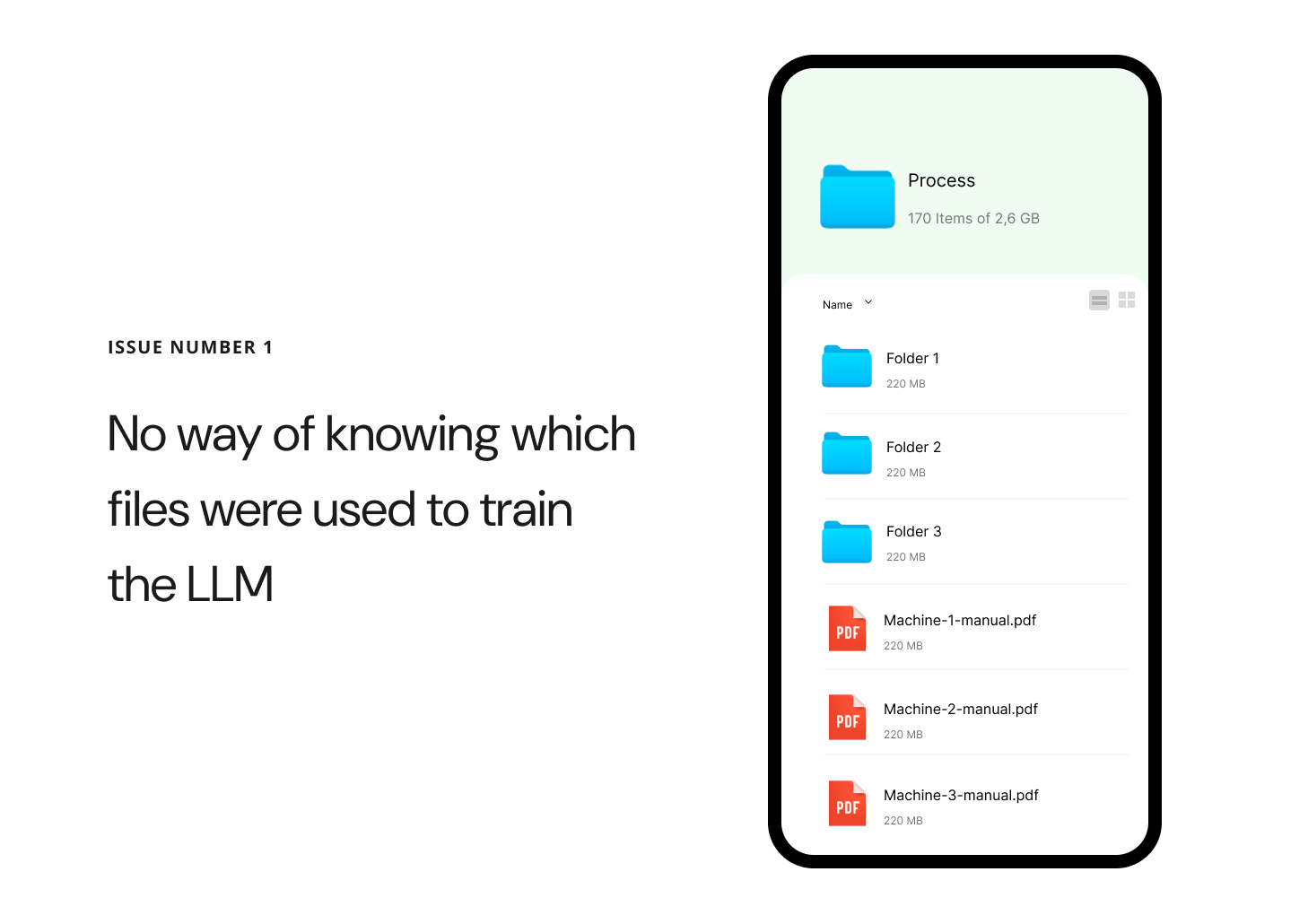
Because the model is only trained at certain times, files uploaded to the server are not automatically tagged, making it impossible to tell which files have already been processed and which are new. This leads to operational inefficiencies and potential data redundancy.
Outdated documentation
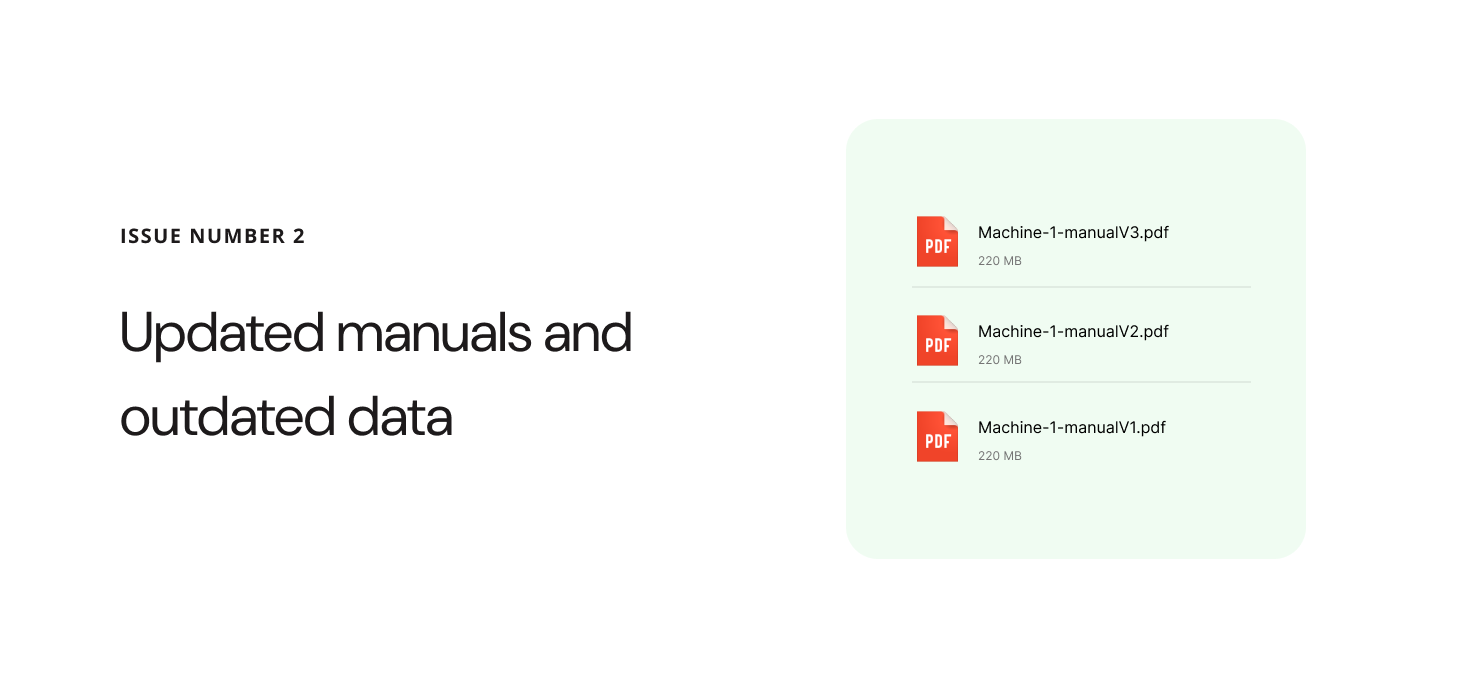
When updated or changed files are added, there’s a risk that the AI will continue to provide information based on outdated data, even though the new files are visible in the database.
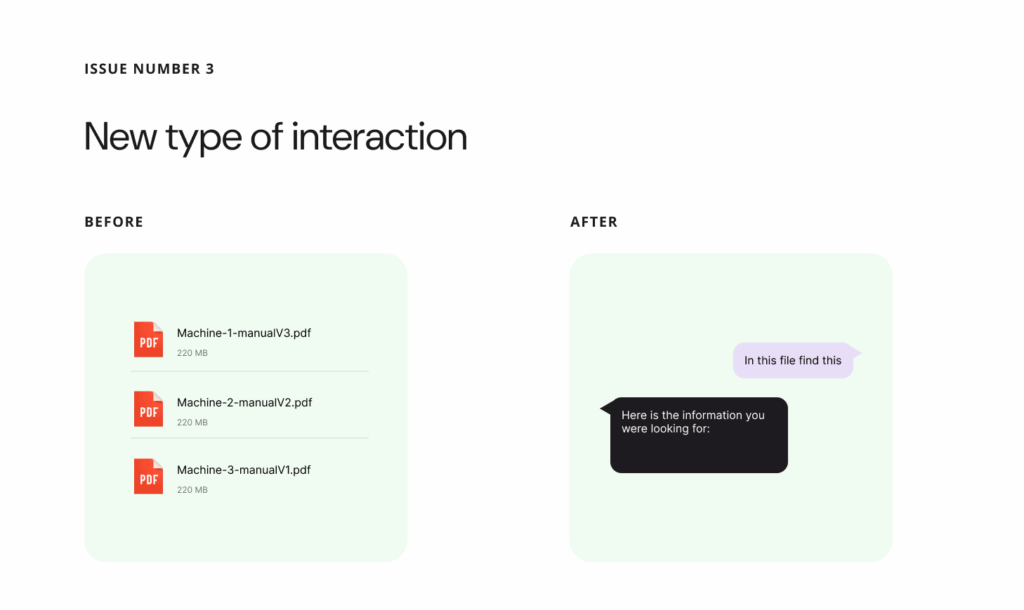
Different user experience
When updated or changed files are added, there’s a risk that the AI will continue to provide information based on outdated data, even though the new files are visible in the database.
03. Constrains
- Model Retraining Constraints and Data Recency
Given the complexity and high cost associated with fully retraining the model, the team needed to anticipate scenarios where the model might be operating on outdated data. To mitigate risks, it was essential to implement clear warnings for employees when they might be working with potentially deprecated information. - User Learning Curve and System Design
The introduction of new features presents employees with a novel user experience. To minimize the need for extensive training, the team prioritized designing a system that is simple and easy to use. However, given the advanced capabilities of large language models (LLMs), some level of user guidance or training may still be necessary to ensure employees can fully leverage the system’s potential. - Technical Limitations and Collaborative Implementation
The team recognized the importance of close collaboration with engineers and back end architects to fully grasp the technical aspects of the proposed solution. This partnership was crucial for developing a vision that could be implemented in an intuitive and coherent manner, despite existing technical constraints.
04. Implementation
Our primary objective was to design an interface that enables users to work with files in a manner that is immediately intuitive and easy to understand. The focus was on minimizing cognitive load, ensuring that users can navigate, locate, and interact with files without confusion or unnecessary steps.
User Experience Emphasis
A significant emphasis was placed on crafting a user experience that unmistakably communicates the chat’s sole purpose: to facilitate straightforward and intuitive file search. Every design decision, from layout to micro-interactions, was guided by the principle of clarity and simplicity.
Key UX/UI Strategies
Clarity of Purpose: The interface employs clear visual cues and concise messaging to reinforce that the chat is dedicated exclusively to file search, reducing the risk of user misinterpretation.
Intuitive Navigation: File search and access pathways are streamlined, with familiar icons, logical grouping, and minimal steps required to complete core tasks.
Consistent Interactions: Interactive elements behave predictably, supporting user confidence and reducing the learning curve.
Feedback and Guidance: Real-time feedback and contextual hints help users understand available actions and system status at every step.
Smart system of uploading files
File Reference and Easy Access
This UX pattern is crafted to clearly indicate that the provided answer is sourced directly from a specific file, ensuring transparency and traceability for users. The design emphasizes both the origin of the information and the ease with which users can access the complete file for further exploration.

Key Features
Clear File Attribution: Each answer prominently displays the file name or identifier, making it immediately obvious where the information originates.
Direct Access Link: A visible and easily accessible button or link allows users to open the full file with a single click, reducing friction and supporting deeper investigation.
Contextual Preview: The answer may include a snippet or preview from the file, giving users context before they decide to open the entire document.
Consistent Placement: File references and access controls are consistently positioned within the interface, ensuring users always know where to look for source information and access options.
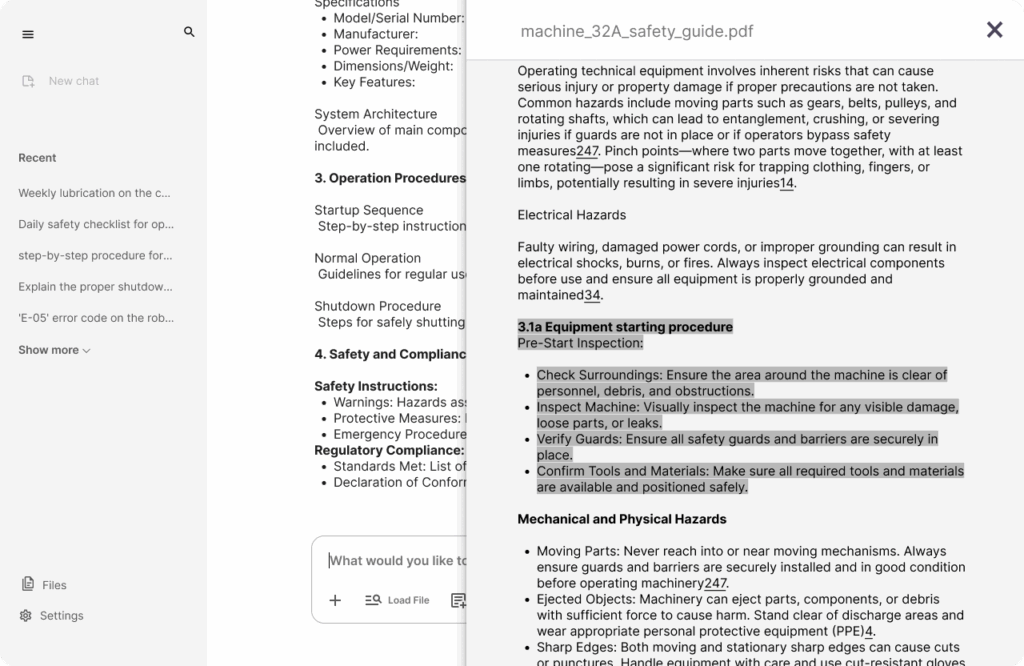
Contextual File Navigation
When a user clicks on a reference within the answer, they are seamlessly redirected to the specific file where the referenced information resides. To enhance clarity and user orientation, the exact portion of the content that was referenced is automatically highlighted within the document.
Key Features
Direct Navigation: Clicking the reference takes the user straight to the relevant file, eliminating unnecessary steps and reducing cognitive load.
Automatic Highlighting: The specific text or section cited in the answer is visually highlighted, making it immediately easy for users to locate and understand the context.
Smooth Transition: The transition from the answer to the file view is designed to be smooth and intuitive, maintaining user focus and minimizing disruption.
Consistent Feedback: Visual cues (such as animations or color changes) confirm that the user has been redirected to the correct location within the file.
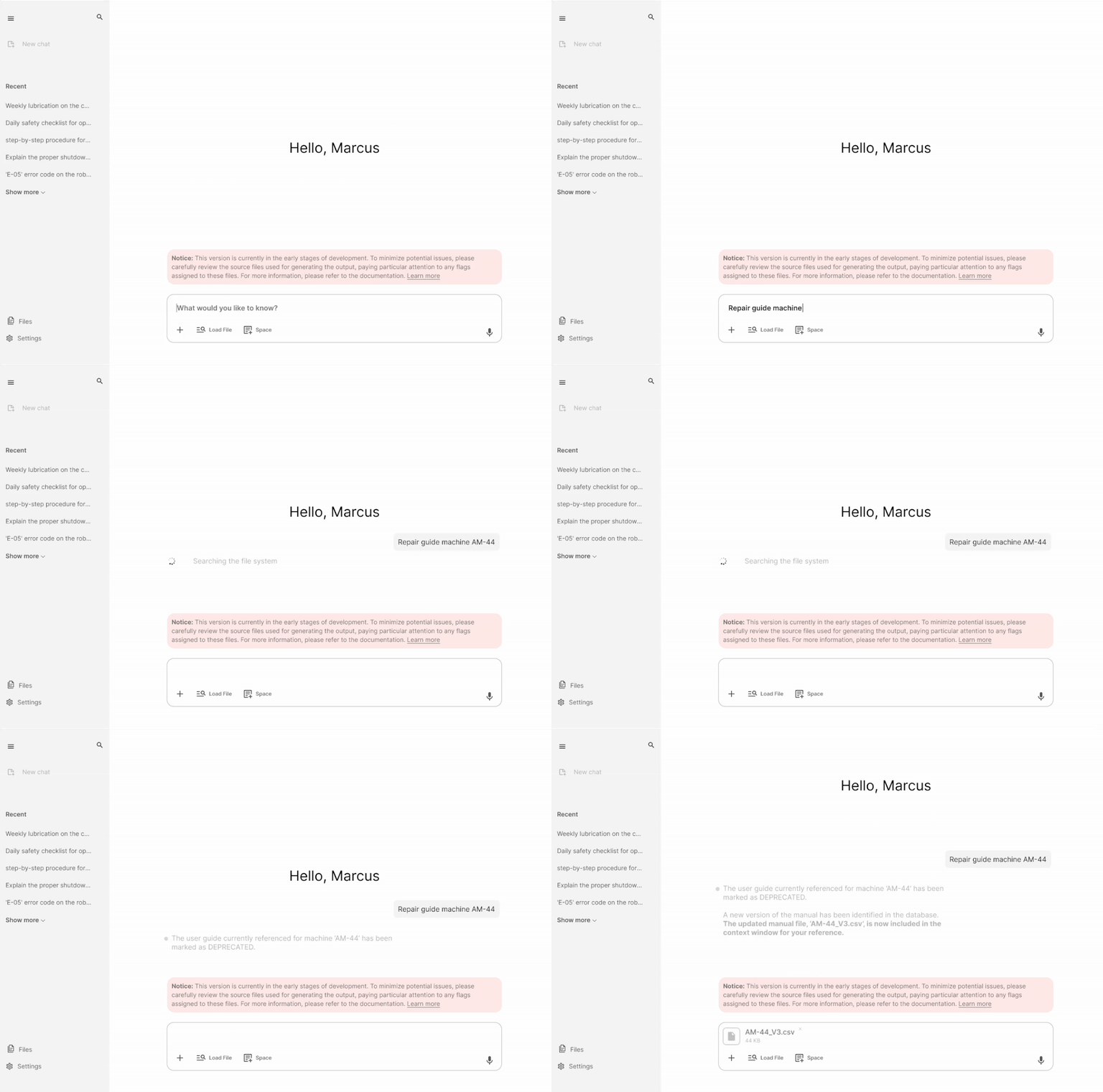
This scenario demonstrates the implementation of both static and dynamic system notifications within an AI-driven workplace solution. The notifications are designed to transparently inform users about potential limitations in the system’s responses—specifically, the possibility of receiving inaccurate answers depending on the context or underlying data integrity.
When a user submits a query, the system proactively scans its database to assess the relevance and currency of available information. In this instance, the system identifies that a file referenced in the query has been marked as deprecated. Leveraging intelligent database integration, the system autonomously locates the most current iteration of the file and integrates it into the contextual window for the user’s review. This process occurs seamlessly, without requiring any manual intervention from employees, thereby maintaining workflow efficiency and minimizing disruption.
Key UX/UI considerations in this scenario include:
Proactive Information Management: The system dynamically updates its response context based on real-time data status, ensuring users always interact with the most accurate information available.
Transparent Communication: Static and dynamic notifications are used to inform users of data limitations, fostering trust and setting clear expectations about answer reliability.
User-Centric Automation: By automating the retrieval and integration of updated files, the system reduces cognitive load and manual effort for employees, aligning with best practices in user-centered design1.
Contextual Awareness: The solution intelligently adapts to changes in underlying data, demonstrating robust integration between data management and user interface layers.
Summary
This approach exemplifies how thoughtful UX/UI design and intelligent system architecture can work in tandem to deliver efficient, reliable, and user-friendly AI solutions in the workplace1.
This project introduced a completely new design solution, which means there was no existing benchmark or reference point for user satisfaction prior to its implementation. As a result, initial assessments focused primarily on establishing a baseline for user experience and interface effectiveness. Following the launch, targeted user feedback was collected to evaluate satisfaction and identify areas for improvement. The feedback revealed a strong overall satisfaction rate of 93%, indicating that the new design has been well received by the user base.
However, critical feedback highlighted several weaker points, most of which stem from technical limitations rather than design flaws. These findings suggest that while the user experience is robust from a design perspective, future enhancements should consider both user expectations and technical feasibility to further optimize the solution.
Leave a Reply